如何为Hexo博客添加一个可爱的麦金塔小电脑加载动画
前言:
本教程是通过修改源码,替换默认加载动画的形式实现,并非在原有的基础上再添加。
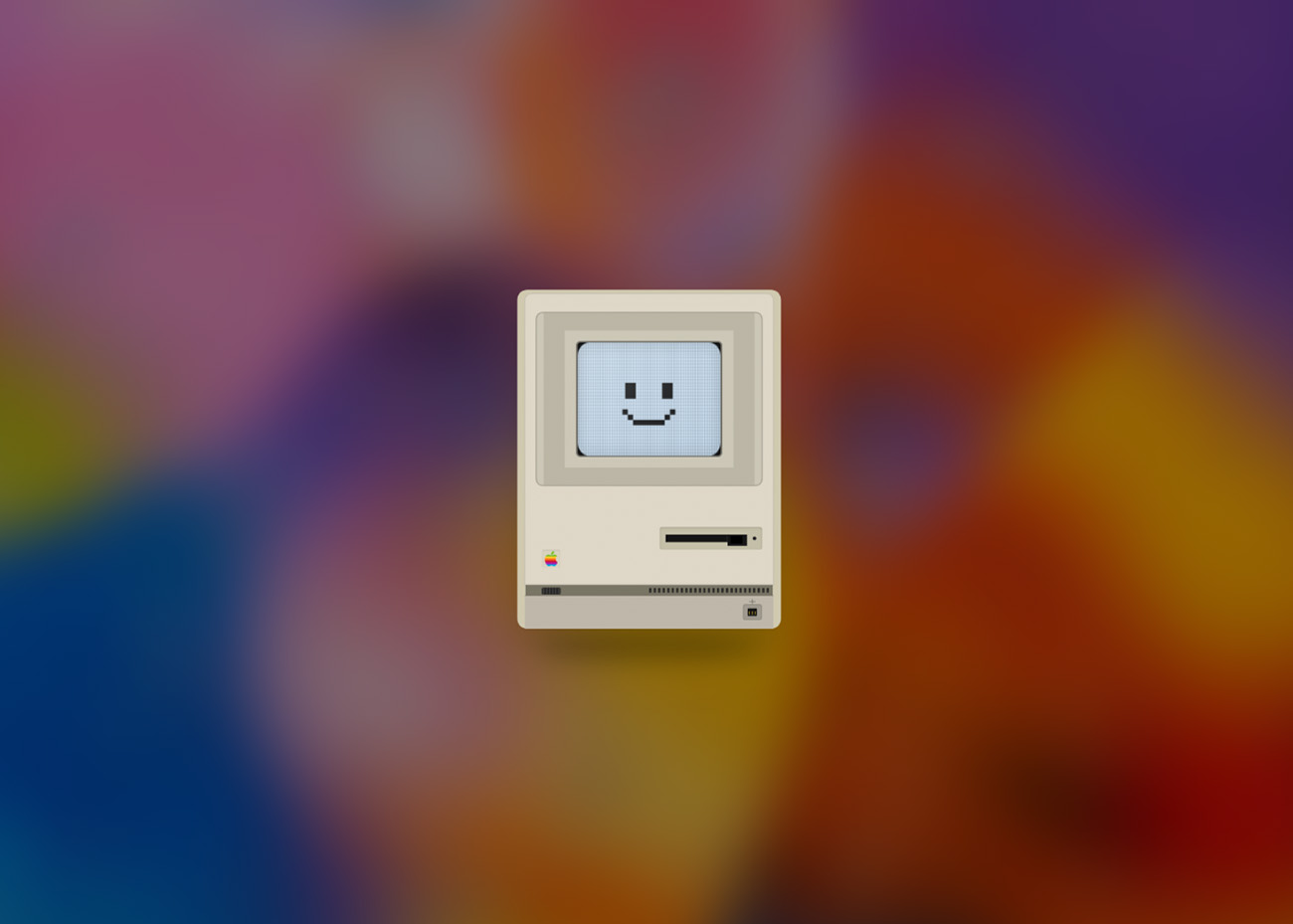
预览
麦金塔小电脑
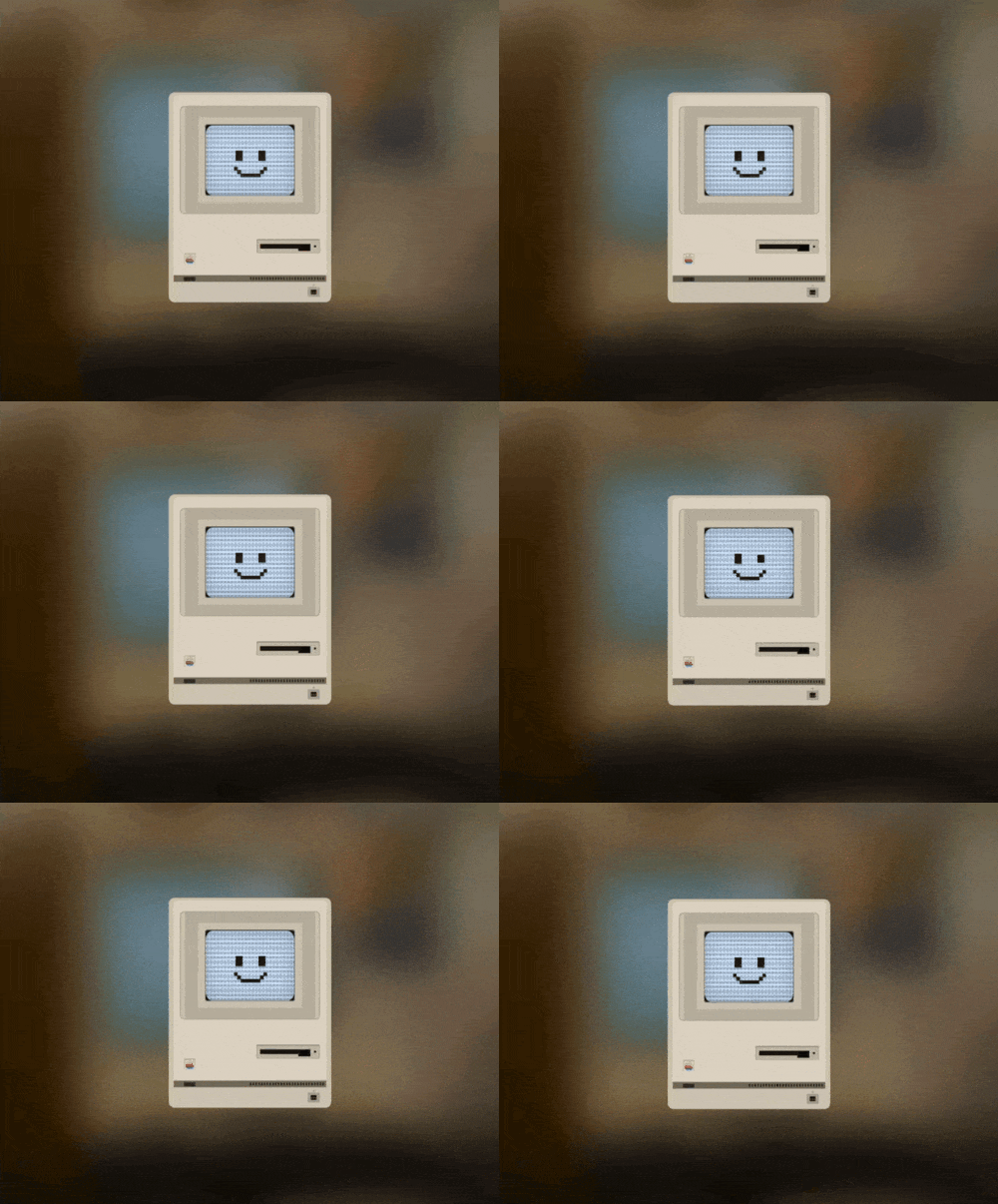
教程
- 修改
[Blogroot]\themes\butterfly\layout\includes\loading\fullpage-loading.pug,复制以下代码替换源文件。1
2
3
4
5
6
7
8
9
10
11
12
13
14
15
16
17
18
19
20
21
22
23
24
25
26
27
28
29
30
31
32
33
34
35
36
37
38
39
40
41
42
43
44
45
46
47
48
49
50
51
52
53
54
55
56
57
58
59
60
61
62
63
64
65
66
67
68
69
70
71
72
73
74
75
76
77
78
79
80
81
82
83
84
85
86
87
88
89
90
91
92
93
94
95
96
97
98
99
100
101
102
103
104
105
106
107
108
109
110
111
112
113
114#loading-box
#mac-loader.loader-wrapper
.mac-content
.screen-overlay
.crt-scanlines
.crt-pixels
.crt-glow
.crt-glare
.happy-mac-icon
svg.happy-mac-svg(viewBox="0 0 32 32", xmlns="http://www.w3.org/2000/svg", shape-rendering="crispEdges", style="image-rendering: pixelated;")
g
rect(x="7", y="10", width="4", height="6", fill="black")
rect.happy-mac-eye-right(x="21", y="10", width="4", height="6", fill="black")
rect(x="6", y="20", width="2", height="2", fill="black")
rect(x="8", y="22", width="2", height="2", fill="black")
rect(x="10", y="24", width="12", height="2", fill="black")
rect(x="22", y="22", width="2", height="2", fill="black")
rect(x="24", y="20", width="2", height="2", fill="black")
svg.mac-body-svg(viewBox="0 0 400 640", xmlns="http://www.w3.org/2000/svg")
defs
filter#matte-texture(x="0%", y="0%", width="100%", height="100%")
feTurbulence(type="fractalNoise", baseFrequency="0.8", numOctaves="3", result="noise")
feColorMatrix(type="matrix", values="1 0 0 0 0 0 1 0 0 0 0 0 1 0 0 0 0 0 0.04 0")
feComposite(operator="in", in2="SourceGraphic", result="textured")
feBlend(in="SourceGraphic", in2="textured", mode="multiply")
filter#inner-depth
feOffset(dx="0", dy="1")
feGaussianBlur(stdDeviation="1.5", result="blur")
feComposite(operator="out", in="SourceGraphic", in2="blur", result="inverse")
feFlood(floodColor="black", floodOpacity="0.3", result="color")
feComposite(operator="in", in="color", in2="inverse", result="shadow")
feComposite(operator="over", in="shadow", in2="SourceGraphic")
filter#ground-shadow(filterUnits="userSpaceOnUse", x="0", y="400", width="400", height="240")
feGaussianBlur(in="SourceAlpha", stdDeviation="16")
feOffset(dx="0", dy="25")
feComponentTransfer
feFuncA(type="linear", slope="0.25")
ellipse(cx="200", cy="490", rx="150", ry="18", fill="#2a2a2a", filter="url(#ground-shadow)")
g(filter="url(#matte-texture)")
path(d="M 40,40 L 360,40 Q 375,40 375,55 L 375,475 Q 375,490 360,490 L 40,490 Q 25,490 25,475 L 25,55 Q 25,40 40,40 Z", fill="#D1CAB0")
path(d="M 45,45 L 355,45 Q 365,45 365,55 L 365,432 L 35,432 L 35,55 Q 35,45 45,45 Z", fill="#E0D8C8", stroke="#FFF", stroke-width="0.5", stroke-opacity="0.5")
rect(x="36", y="432", width="328", height="14", fill="#7A7565")
line(x1="35", y1="432", x2="365", y2="432", stroke="rgba(0,0,0,0.1)", stroke-width="1")
g
path(d="M 35,446 L 365,446 L 365,490 L 35,490 Z", fill="#E0D8C8")
path(d="M 35,446 L 365,446 L 365,490 L 35,490 Z", fill="#000000", opacity="0.15")
line(x1="35", y1="446", x2="365", y2="446", stroke="rgba(0,0,0,0.3)", stroke-width="1")
path(d="M 35,55 Q 35,45 45,45 L 355,45 Q 365,45 365,55 L 365,432 L 35,432 Z", fill="none", stroke="rgba(0,0,0,0.1)", stroke-width="1.5")
path(d="M 60,70 H 340 Q 350,70 350,80 V 290 Q 350,300 340,300 H 60 Q 50,300 50,290 V 80 Q 50,70 60,70 Z", fill="#CDC8B8", stroke="#A8A496", stroke-width="1.5")
path(d="M 60,70 L 88,94 H 312 L 340,70 Z M 340,70 L 312,94 V 276 L 340,300 Z M 340,300 L 312,276 H 88 L 60,300 Z M 60,300 L 88,276 V 94 L 60,70 Z", fill="#B0AC9A", opacity="0.6")
rect(x="103", y="108", width="194", height="154", rx="5", fill="#222", opacity="0.2")
rect(x="105", y="110", width="190", height="150", rx="4", fill="#181818")
rect(x="105", y="110", width="190", height="150", rx="4", fill="none", stroke="black", stroke-width="4", opacity="0.3")
g(transform="translate(214, 355)")
rect(x="0", y="0", width="136", height="30", rx="3", fill="#C4BFA8", filter="url(#inner-depth)")
g(fill="#151515")
rect(x="8", y="10", width="82", height="10")
rect(x="90", y="10", width="26", height="15")
rect(x="94", y="12", width="16", height="10", rx="1", fill="#000")
circle(cx="126", cy="15", r="2.5", fill="#1a1a1a")
circle(cx="126", cy="15", r="2.5", fill="none", stroke="rgba(255,255,255,0.4)", stroke-width="0.5")
g(transform="translate(58, 385)")
rect(x="0", y="0", width="24", height="24", rx="2", fill="#d6d1bc", filter="url(#inner-depth)", opacity="0.6")
image(href="https://bu.dusays.com/2026/01/10/69615ec6628c9.png", x="3", y="2", width="18", height="20")
g(transform="translate(200, 436)")
defs
pattern#shelf-vent(x="0", y="0", width="6", height="6", patternUnits="userSpaceOnUse")
rect(x="0", y="0", width="3", height="6", fill="#1a1a1a", opacity="0.8")
rect(x="0", y="0", width="160", height="6", fill="url(#shelf-vent)")
g(transform="translate(58, 436)")
rect(x="0", y="0", width="24", height="8", rx="1", fill="#3a3a3a", stroke="#111", stroke-width="0.5")
g(stroke="#111", stroke-width="1")
line(x1="4", y1="0", x2="4", y2="8")
line(x1="8", y1="0", x2="8", y2="8")
line(x1="12", y1="0", x2="12", y2="8")
line(x1="16", y1="0", x2="16", y2="8")
line(x1="20", y1="0", x2="20", y2="8")
g(transform="translate(325, 458)")
path(d="M 8,-4 H 16", stroke="#444", stroke-width="1", opacity="0.6")
path(d="M 12,-7 V -1", stroke="#444", stroke-width="1", opacity="0.6")
rect(x="0", y="0", width="24", height="20", rx="2", fill="#2a2a2a", opacity="0.2")
rect(x="0", y="0", width="24", height="20", rx="2", fill="none", stroke="rgba(0,0,0,0.2)", stroke-width="1")
rect(x="6", y="5", width="12", height="10", rx="1", fill="#111")
g(stroke="#d4af37", stroke-width="1")
line(x1="8", y1="13", x2="8", y2="9")
line(x1="12", y1="13", x2="12", y2="9")
line(x1="16", y1="13", x2="16", y2="9")
script.
(function() {
var loader = document.getElementById('mac-loader');
function hideLoader() {
if (!loader.classList.contains('loaded')) {
loader.classList.add('loaded');
setTimeout(function() {
loader.style.display = 'none';
}, 2000);
}
}
window.addEventListener('load', hideLoader);
setTimeout(hideLoader, 5000);
})();
script(async).
var preloader = {
endLoading: () => {
document.body.style.overflow = 'auto';
document.getElementById('loading-box').classList.add("loaded")
},
initLoading: () => {
document.body.style.overflow = '';
document.getElementById('loading-box').classList.remove("loaded")
}
}
setTimeout(function(){preloader.endLoading();}, 5000);
- 注意:如果用自己的代码修改源文件,开头的
#loading-box不要删除。
- 修改
[Blogroot]\themes\butterfly\source\css\_layout\loading.styl,复制以下代码替换源文件。1
2
3
4
5
6
7
8
9
10
11
12
13
14
15
16
17
18
19
20
21
22
23
24
25
26
27
28
29
30
31
32
33
34
35
36
37
38
39
40
41
42
43
44
45
46
47
48
49
50
51
52
53
54
55
56
57
58
59
60
61
62
63
64
65
66
67
68
69
70
71
72
73
74
75
76
77
78
79
80
81
82
83
84
85
86
87
88
89
90
91
92
93
94
95
96
97
98
99
100
101
102
103
104
105
106
107
108
109
110
111
112
113
114
115
116
117
118
119
120
121
122
123
124
125
126
127
128
129
130
131
132
133
134
135
136
137
138
139
140
141
142
143
144
145
146
147
148
149/* Loader Container - Fixed Fullscreen */
.loader-wrapper
position fixed
top 0
left 0
width 100%
height 100%
z-index 9999
display flex
align-items center
justify-content center
/* Glassmorphism Background */
background-color rgba(255, 255, 255, 0.15)
backdrop-filter blur(20px) saturate(170%)
-webkit-backdrop-filter blur(20px) saturate(170%)
transition opacity 1.5s cubic-bezier(0.4, 0, 0.2, 1), backdrop-filter 1.5s cubic-bezier(0.4, 0, 0.2, 1)
@media (prefers-color-scheme dark)
background-color rgba(0, 0, 0, 0.4)
/* Dark Mode Support (Using data-theme attribute or standard dark media query) */
[data-theme="dark"] .loader-wrapper
background-color rgba(0, 0, 0, 0.4)
/* Fade Out State */
.loader-wrapper.loaded
opacity 0
backdrop-filter blur(0)
-webkit-backdrop-filter blur(0)
pointer-events none
/* Main Content Wrapper (Floats) */
/* Increased size for better visibility */
.mac-content
position relative
width 160px /* Increased from 100px */
height auto
animation mac-float 6s ease-in-out infinite
/* Removed CSS drop-shadow to use the SVG's higher quality ground shadow */
@media (min-width 640px)
width 180px
@media (min-width 768px)
width 200px
/* The SVG Body */
.mac-body-svg
width 100%
height auto
display block
position relative
z-index 10
/*
Screen Overlay
Positioned absolutely to match the SVG's CRT coordinates.
Updated for Thicker Bezels & new ViewBox Height (640px):
X: 105/400 = 26.25%
Y: 110/640 = 17.1875%
W: 190/400 = 47.5%
H: 150/640 = 23.4375%
*/
.screen-overlay
position absolute
top 17.19%
left 26.25%
width 47.5%
height 23.44%
background-color #D4EBFF /* Pale Blue Backlight */
border-radius 8% / 12% /* Matches CRT curvature */
overflow hidden
z-index 20
display flex
align-items center
justify-content center
/* Happy Mac Icon Container */
.happy-mac-icon
width 75%
height 75%
opacity 0.9
position relative
z-index 10 /* Lower than CRT effects to look "inside" */
.happy-mac-svg
width 100%
height 100%
filter drop-shadow(0 1px 1px rgba(0,0,0,0.1))
/* Apply animation only to the right eye */
.happy-mac-eye-right
animation mac-wink 4s infinite
transform-origin center
transform-box fill-box
/* --- CRT Effects --- */
/* 1. Scanlines */
.crt-scanlines
position absolute
inset 0
background linear-gradient(to bottom, transparent 50%, rgba(0, 0, 0, 0.15) 50%)
background-size 100% 4px
z-index 20 /* On top of icon */
pointer-events none
/* 2. Pixel Grid Texture */
.crt-pixels
position absolute
inset 0
background-image radial-gradient(circle, rgba(0, 0, 0, 0.5) 1px, transparent 1px)
background-size 3px 3px
opacity 0.3
mix-blend-mode multiply /* Dark pixels on light bg */
z-index 20 /* On top of icon */
pointer-events none
/* 3. Inner Glow (Vignette) */
.crt-glow
position absolute
inset 0
box-shadow inset 0 0 15px rgba(0,0,0,0.2)
border-radius inherit
z-index 30
pointer-events none
/* 4. Glass Glare */
.crt-glare
position absolute
inset 0
background linear-gradient(135deg, rgba(255,255,255,0.1) 0%, transparent 40%)
pointer-events none
z-index 40
/* Keyframes */
@keyframes mac-float
0%, 100%
transform translateY(0px)
50%
transform translateY(-8px)
@keyframes mac-wink
0%, 90%
transform scaleY(1)
95%
transform scaleY(0.1)
100%
transform scaleY(1)
- 至此,Macintosh加载动画的布局和样式已经全部完成,如果出现加载背景透明问题,修改透明度无效果,可以用引用原来
loading.styl定义颜色的办法。想要修改颜色,打开[Blogroot]\themes\butterfly\source\css\var.styl里面找到$preloader-bg修改颜色即可。
如今AI发展的如此之快,如果想在要更多独一无二的加载动画效果,完全可以通过AI来生成,比如Google Gemini 3 Pro ,只需要提供素材和提示词。但生成的文件可能需要转译成 Pug 和 Stylus 格式,关于这个,博主也有这样的应用,会在后续更新开放。
相关推荐
2025-12-07
Minecraft旋转方块加载动画
前言本教程是通过修改源码,替换默认加载动画的形式实现,并非在原有的基础上再添加。如果想要有好几个加载动画,随时可切换的话,可以参考Akilar店长关于Butterfly添加多个加载动画 的教程。 教程 Minecraft加载动画预览 修改 [Blogroot]\themes\butterfly\layout\includes\loading\fullpage-loading.pug,复制以下代码替换源文件。 1234567891011121314151617181920212223242526#loading-box .loading-container .show-front.animate .loading-front .loading-back .loading-right .loading-left .loading-top .loading-bottom h1 | L...
2025-12-18
星球大战BB-8加载动画
前言本教程是通过修改源码,替换默认加载动画的形式实现,并非在原有的基础上再添加。如果想要有好几个加载动画,随时可切换的话,可以参考Akilar店长关于Butterfly添加多个加载动画 的教程。 BB-8加载动画预览 教程 修改 [Blogroot]\themes\butterfly\layout\includes\loading\fullpage-loading.pug,复制以下代码替换源文件。12345678910111213141516#loading-box .bb8-loadingWarp .loading-bb8script(async). var preloader = { endLoading: () => { document.body.style.overflow = 'auto'; document.getElementByI...

2025-12-10
css小幽灵系列加载动画
前言本教程是通过修改源码,替换默认加载动画的形式实现,并非在原有的基础上再添加。如果想要有好几个加载动画,随时可切换的话,可以参考Akilar店长关于Butterfly添加多个加载动画 的教程。 更新日志 更新日志 2026.01.19 整体修改新版本butterfly的pug文件 2025.12.14 新增SVG小幽灵加载动画 2025.12.12 新增爱心小幽灵加载动画、发光小幽灵加载动画 2025.12.10 新增带小星星的小幽灵加载动画 教程带星星小幽灵 带星星小幽灵加载动画预览 ...
2025-12-09
aplayer吸底插件高斯模糊样式及适配深色模式
此教程强制关闭了歌词和歌词按钮,需要歌词的请酌情修改。 修改后样式预览 修改aplayer吸底插件高斯模糊样式并适配深色模式 以Butterfly主题为例,在[Blogroot]\themes\butterfly\source\css\路径下新建_custom文件夹,在此文件夹下新建custom.css,并在主题配置文件inject配置项head处引入,如果已经有了请忽略此步骤。 123inject: head:+ - <link rel="stylesheet" href="/css/_custom/custom.css" media="defer" onload="this.media='all'"> 将以下添加高斯模糊效果的代码粘贴至刚建的custom.css中。 1234567891011121314151617181920212...
2026-01-28
博客修改微调记录
为站点添加或修改微调的一些记录
2022-05-14
关于博客字体压缩
前言本篇文章所讲的方法需要用到Python环境,并已安装Pip,安装方法这里就不多说了。我使用的Python和Pip版本如下。 教程 新建一个文件夹,放入你准备压缩的字体和字体编码文件(点击下载),如下图。 在该文件夹打开终端,输入以下命令安装fonttools插件。 1pip install fonttools 看到以下内容说明安装成功。 然后输入以下命令,进行字体压缩。1pyftsubset MiSans-Normal.ttf --unicodes-file=sc_unicode.txt 该命令中MiSans-Normal.ttf是目录中待压缩的字体名称,sc_unicode.txt为字符编码。 执行完命令,压缩完成,目录中出现已压缩的字体,可以看到压缩效果还是可以的。 在浏览器中搜索字体格式在线转换,将刚才已经压缩好的字体导入,进行进一步压缩。这里使用Convertio。 压缩好后就是Woff格式的字体了,点击下载即可。下面是我压缩后的一些字体效果。 后话二次压缩那里其实可以使用Google woff2的办法,但需要下载源码,比较麻烦,所以就使...
评论