右侧菜单栏全局aplayer播放器
前言
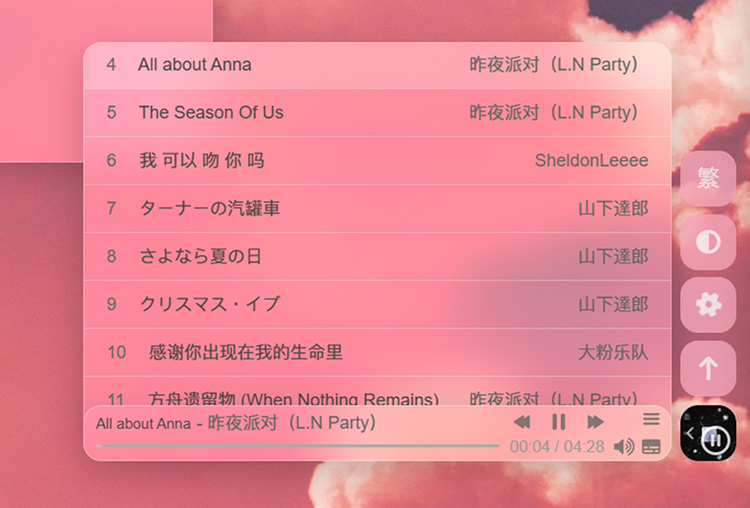
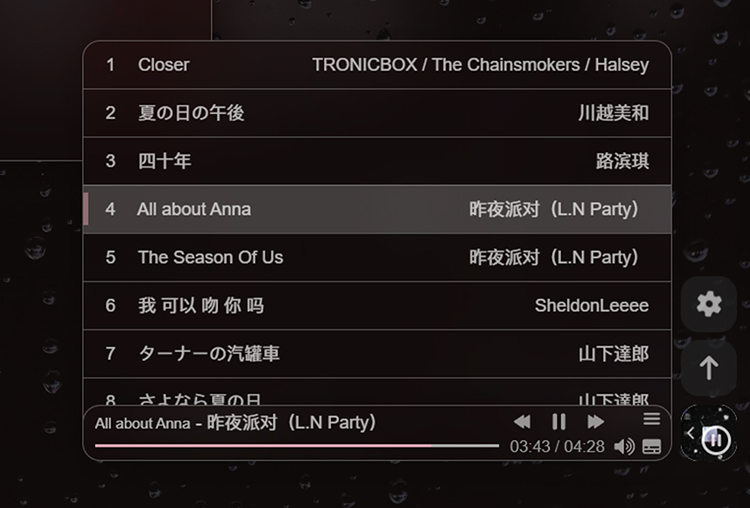
起因是觉得原有的全局吸底播放器放在左侧,一图流背景下有点碍眼,就想到把它放到右边菜单栏,跟着菜单栏一起移动。
效果预览
- 适配了暗黑模式,并修改了毛玻璃效果。
教程
基础配置
- 首先安装
Aplayer插件,输入以下命令安装:1
npm install --save hexo-tag-aplayer - 在配置文件
[Blogroot]\_config.yml或主题配置文件[Blogroot]\_config.butterfly.yml中添加以下配置项:1
2
3aplayer:
meting: true
asset_inject: false - 在主题配置文件
[Blogroot]\_config.butterfly.yml中开启aplayerInject配置项:1
2
3aplayerInject:
enable: true
per_page: true - 在主题配置文件
[Blogroot]\_config.butterfly.yml的inject配置项中添加以下内容:1
2
3
4
5
6inject:
head:
# - <link rel="stylesheet" href="/xxx.css">
bottom:
# - <script src="xxxx"></script>
- <div class="aplayer rightside-aplayer no-destroy" id="aplayer" data-id="8429082619" data-server="tencent" data-type="playlist" data-fixed="true" data-autoplay="false" data-lrcType="-1"> </div>参数说明
Option Default Description id required song id / playlist id / album id / search keyword server required Music platform: netease,tencent,kugou,xiami,baidutype required song,playlist,album,search,artistfixed falseEnable fixed mode mini falseEnable mini mode loop allPlayer loop play, values: ‘all’, ‘one’, ‘none’ order listPlayer play order, values: ‘list’, ‘random’ volume 0.7 Default volume, notice that player will remember user setting, default volume will not work after user set volume themselves lrctype 0 Lyric type listfolded falseIndicate whether list should folded at first autoplay falseAutoplay song(s), not supported by mobile browsers mutex truePause other players when this player playing listmaxheight 340pxMax height of play list preload autoThe way to load music, can be none,metadata,autostoragename metingjsLocalStorage key that store player setting theme #ad7a86Theme color
魔改步骤
- 在
[Blogroot]\themes\butterfly\source\css\custom\目录下新建rightside_aplayer.css文件:1
2
3
4
5
6
7
8
9
10
11
12
13
14
15
16
17
18
19
20
21
22
23
24
25
26
27
28
29
30
31
32
33
34
35
36
37
38
39
40
41
42
43
44
45
46
47
48
49
50
51
52
53
54
55
56
57
58
59
60
61
62
63
64
65
66
67
68
69
70
71
72
73
74
75
76
77
78
79
80
81
82
83
84
85
86
87
88
89
90
91
92
93
94
95
96
97
98
99
100
101
102
103
104
105
106
107
108
109
110
111
112
113
114
115
116
117
118
119
120
121
122
123
124
125
126
127
128
129
130
131
132
133
134
135
136
137
138
139
140
141
142
143
144
145
146
147
148
149
150
151
152
153
154
155
156
157
158
159
160
161
162
163
164
165
166
167
168
169
170
171
172
173
174
175
176
177
178
179
180
181
182
183
184
185
186
187
188
189
190
191
192
193
194
195
196
197
198
199
200
201
202
203
204
205
206
207
208
209
210
211
212
213
214
215
216
217
218
219
220
221
222
223
224
225
226
227
228
229
230
231
232
233
234
235
236
237
238
239
240
241
242
243
244
245
246
247
248
249
250
251
252
253
254
255
256
257
258
259
260
261
262
263
264
265
266
267
268
269
270
271
272
273
274
275
276
277
278
279
280
281
282
283
284
285
286
287
288
289
290
291#aplayer.rightside-aplayer {
bottom: -38px;
border-radius: 0.75rem;
/* right: -48px; */
width: 38px;
height: 38px;
opacity: 0;
visibility: hidden;
/* 关键:确保 transition 包含 opacity 和 transform (或 right) */
transition: all 0.5s ease-in-out;
transform: translateX(100%);
}
#aplayer.rightside-aplayer.aplayer-active {
right: 20px;
opacity: 1;
visibility: visible;
transform: translateX(0);
}
#aplayer.rightside-aplayer .aplayer-pic {
width: 38px !important;
height: 38px !important;
border-radius: 0.75rem;
}
#aplayer.rightside-aplayer .aplayer-body {
margin-top: 100px;
/* left: calc(100% - 48px) !important;
right: 11px; */
width: 38px !important;
height: 38px;
/* bottom: 49px; */
padding-right: 0px;
border-radius: 0.75rem;
/* animation: slideInFromLeft 1s ease forwards; */
}
#aplayer.rightside-aplayer.aplayer-fixed {
left: revert;
right: 10px;
bottom: 49px;
position: fixed;
}
#aplayer.rightside-aplayer .aplayer-info {
position: absolute;
right: 44px;
width: 0;
padding: 0 6px 0 5px;
width: 0;
opacity: 0;
overflow: hidden;
transition: width 0.3s ease, opacity 0.3s ease; /* 宽度动画 */
height: 38px;
border-radius: 0.75rem;
/* 背景颜色 */
background: rgba(255, 255, 255, 0.3);
backdrop-filter: blur(19px) saturate(170%);
-webkit-backdrop-filter: blur(19px) saturate(170%);
border: 1px solid rgba(255, 255, 255, 0.3);
box-shadow:
0 4px 30px rgba(0, 0, 0, 0.1),
0 10px 20px rgba(0, 0, 0, 0.1);
}
#aplayer.rightside-aplayer .aplayer-info.aplayer-info-show{
width: 400px; /* 设置你想要的展开宽度 */
opacity: 1;
}
[data-theme="dark"] #aplayer.rightside-aplayer .aplayer-info {
background: rgba(18, 18, 18, 0.15) !important;
}
[data-theme="dark"] #aplayer.rightside-aplayer .aplayer-info .aplayer-music {
color: rgba(255, 255, 255, 0.7);
}
[data-theme="dark"] #aplayer.rightside-aplayer .aplayer-info .aplayer-title {
color: rgba(255, 255, 255, 0.7);
}
[data-theme="dark"] #aplayer.rightside-aplayer .aplayer-info .aplayer-music .aplayer-author {
color: rgba(255, 255, 255, 0.7);
}
#aplayer.rightside-aplayer .aplayer-icon-play {
bottom: 20px;
width: 20px;
height: 16px;
left: 30.5px;
}
#aplayer.rightside-aplayer .aplayer-icon-play svg{
margin: 2px 0 0 0;
}
[data-theme="dark"] #aplayer.rightside-aplayer .aplayer-info .aplayer-controller .aplayer-time .aplayer-icon path {
fill: rgba(255, 255, 255, 0.7);
}
#aplayer.rightside-aplayer .aplayer-icon-back {
bottom: 20px;
width: 20px;
height: 16px;
left: 6px;
}
#aplayer.rightside-aplayer .aplayer-icon-back svg{
margin-top: 2px;
}
#aplayer.rightside-aplayer .aplayer-icon-forward {
bottom: 20px;
width: 20px;
height: 16px;
left: 55px;
}
#aplayer.rightside-aplayer .aplayer-icon-forward svg{
margin-top: -2px;
}
#aplayer.rightside-aplayer .aplayer-icon-menu {
bottom: 20px;
width: 15px;
height: 16px;
}
#aplayer.rightside-aplayer .aplayer-miniswitcher {
right: 25px;
width: 13px;
border-radius: 8px 0 0 8px;
border: none;
background: transparent;
}
#aplayer.rightside-aplayer .aplayer-miniswitcher .aplayer-icon svg path{
fill: #fff;
box-shadow: 0 2px 2px rgba(0, 0, 0, 0.5), 0 2px 2px rgba(0, 0, 0, 0.5);
}
#aplayer.rightside-aplayer .aplayer-info .aplayer-music {
height: 16px;
margin: 3px 0 0 3px;
}
#aplayer.rightside-aplayer .aplayer-info .aplayer-music .aplayer-title {
font-size: 10px;
}
#aplayer.rightside-aplayer .aplayer-info .aplayer-controller .aplayer-bar-wrap {
padding: 5px 0;
margin-left: 3px;
}
#aplayer.rightside-aplayer .aplayer-info .aplayer-controller .aplayer-bar-wrap .aplayer-bar .aplayer-played {
background: rgba(245, 166, 185, 0.7)!important;
}
#aplayer.rightside-aplayer .aplayer-info .aplayer-controller .aplayer-bar-wrap .aplayer-bar .aplayer-played .aplayer-thumb{
background: rgba(245, 166, 185, 0.85)!important;
}
#aplayer.rightside-aplayer .aplayer-info .aplayer-controller .aplayer-time {
bottom: 1px;
}
#aplayer.rightside-aplayer .aplayer-list {
position: fixed;
right: 44px;
margin-bottom: 102px;
bottom: -75px;
border: none;
border-radius: 0.75rem 0.75rem 0 0;
width: 0;
opacity: 0;
padding-bottom: 7px;
visibility: visible;
overflow: hidden;
transition: width 0.3s ease, opacity 0.3s ease; /* 宽度动画 */
display: block !important;
overflow: hidden;
/* 背景颜色 */
background: rgba(255, 255, 255, 0.3);
backdrop-filter: blur(19px) saturate(170%);
-webkit-backdrop-filter: blur(19px) saturate(170%);
border: 1px solid rgba(255, 255, 255, 0.3);
box-shadow:
0 4px 30px rgba(0, 0, 0, 0.1),
0 10px 20px rgba(0, 0, 0, 0.1);
}
#aplayer.rightside-aplayer .aplayer-list.aplayer-list-show {
width: 398.5px; /* 设置你想要的展开宽度 */
opacity: 1;
}
#aplayer.rightside-aplayer .aplayer-list ol {
scrollbar-width: none;
/* 隐藏滚动条 */
}
#aplayer.rightside-aplayer .aplayer-list ol li {
border-top: 0.5px solid rgba(255, 255, 255, 0.3);
}
#aplayer.rightside-aplayer .aplayer-list ol li:first-child {
border: none;
}
#aplayer.rightside-aplayer .aplayer-list ol .aplayer-list-light .aplayer-list-cur {
background-color: rgba(245, 166, 185, 0.45) !important;
}
[data-theme="dark"] #aplayer.rightside-aplayer .aplayer-list {
background: rgba(18, 18, 18, 0.15) !important;
}
[data-theme="dark"] #aplayer.rightside-aplayer .aplayer-list ol li {
color: rgba(255, 255, 255, 0.7) !important;
}
[data-theme="dark"] #aplayer.rightside-aplayer .aplayer-list ol li .aplayer-list-author {
color: rgba(255, 255, 255, 0.7) !important;
}
#aplayer.rightside-aplayer .aplayer-list ol .aplayer-list-light {
background: rgba(255, 255, 255, 0.2);
}
/* [data-theme="dark"] #aplayer.rightside-aplayer .aplayer-list ol .aplayer-list-light{
background: rgba(255, 255, 255, 0.2);
} */
[data-theme="dark"] #aplayer.rightside-aplayer .aplayer-list ol .aplayer-list-index {
color: rgba(255, 255, 255, 0.7);
}
#aplayer.rightside-aplayer .aplayer-list ol li:hover {
background: rgba(255, 255, 255, 0.2);
}
#aplayer.rightside-aplayer .aplayer-pic .aplayer-play {
width: 16px;
height: 16px;
border: 2px solid #fff;
bottom: 27px;
right: 29px;
margin: 0 -25px -23px 0;
}
#aplayer.rightside-aplayer .aplayer-pic .aplayer-play svg {
position: absolute;
top: 1.5px;
left: 2.5px;
height: 13px;
width: 13px;
}
#aplayer.rightside-aplayer .aplayer-notice {
display: none;
}
.aplayer.aplayer-fixed>.aplayer-lrc {
display: none;
}
@media (max-width: 460px) {
#aplayer.rightside-aplayer .aplayer-info.aplayer-info-show {
overflow: hidden;
display: inline-block;
width: 300px;
}
}
@media (max-width: 460px) {
#aplayer.rightside-aplayer .aplayer-list.aplayer-list-show {
width: 298.5px; /* 设置你想要的展开宽度 */
opacity: 1;
}
}- 我这里通过添加自建
css文件覆盖原有的样式,有点乱,也可以将原始的css文件下载到本地修改。
- 我这里通过添加自建
- 在主题配置文件
[Blogroot]\_config.butterfly.yml的inject配置项中添加以下内容:1
2
3
4
5inject:
head:
- <link rel="stylesheet" href="/css/custom/rightside_aplayer.css">
bottom:
# - <script src="xxxx"></script> - 在
[Blogroot]\themes\butterfly\source\js\custom\目录下新建rightside_aplayer.js文件:1
2
3
4
5
6
7
8
9
10
11
12
13
14
15
16
17
18
19
20
21
22
23
24
25
26
27
28
29
30
31
32
33
34
35
36
37
38
39
40
41
42
43
44
45
46
47
48
49
50
51
52
53
54
55
56
57
58
59
60
61
62
63
64
65
66
67
68
69
70
71
72
73
74
75(function () {
const initAplayerScroll = () => {
// 1. 获取目标元素
const target = document.getElementById('aplayer');
// 2. 容错判断:如果当前页面没这个元素,直接结束,不执行后续逻辑
if (!target) return;
// 3. 核心滚动逻辑
const handleScroll = () => {
// 获取滚动距离(兼容各浏览器)
const scrollTop = window.scrollY || document.documentElement.scrollTop;
// 超过 100px 则添加类名,否则移除
if (scrollTop > 95) {
target.classList.add('aplayer-active');
} else {
target.classList.remove('aplayer-active');
}
};
// 4. 监听滚动事件(增加节流以优化性能)
let ticking = false;
window.addEventListener('scroll', () => {
if (!ticking) {
window.requestAnimationFrame(() => {
handleScroll();
ticking = false;
});
ticking = true;
}
}, { passive: true });
// 5. 初始化执行一次,防止刷新页面时已在滚动条下方
handleScroll();
};
// 确保 DOM 加载后运行
if (document.readyState === 'loading') {
document.addEventListener('DOMContentLoaded', initAplayerScroll);
} else {
initAplayerScroll();
}
})();
const btn = document.querySelector('.aplayer-miniswitcher .aplayer-icon');
const list = document.querySelector('.aplayer-list');
document.addEventListener('click', (e) => {
// 1. 检查点击的是否是切换按钮或其图标
const toggleBtn = e.target.closest('.aplayer-miniswitcher .aplayer-icon');
if (toggleBtn) {
const list = document.querySelector('.aplayer-list');
if (list) {
list.classList.toggle('aplayer-list-show');
}
}
});
const info = document.querySelector('.aplayer-info');
document.addEventListener('click', (e) => {
// 1. 检查点击的是否是切换按钮或其图标
const toggleBtn = e.target.closest('.aplayer-miniswitcher .aplayer-icon');
if (toggleBtn) {
const list = document.querySelector('.aplayer-info');
if (list) {
list.classList.toggle('aplayer-info-show');
}
}
});- 这个是用于监听页面滚动,控制播放器的显示和隐藏,并与侧边按钮的显隐同步。
- 在主题配置文件
[Blogroot]\_config.butterfly.yml的inject配置项中添加以下内容:1
2
3
4
5
6inject:
head:
# - <link rel="stylesheet" href="/xxx.css">
bottom:
# - <script src="xxxx"></script>
- <script src="/js/custom/rightside_aplayer.js"></script> - 输入
hexo cl&hexo g&hexo s重新生成静态文件,刷新页面即可查看效果。
后记
- 为什么没有直接写进
rightside的pug文件里?- 试过,而且这样可以完全和侧边栏同步,效果也很好,但是
MetingJS会失效,切换页面后播放器也会强制刷新,没有找到更合适的解决办法,欢迎大佬们完善。
- 试过,而且这样可以完全和侧边栏同步,效果也很好,但是
- 代码写的比较乱,可以自行优化下。
相关推荐
2026-01-28
博客修改微调记录
为站点添加或修改微调的一些记录
2025-12-09
aplayer吸底插件高斯模糊样式及适配深色模式
此教程强制关闭了歌词和歌词按钮,需要歌词的请酌情修改。 修改后样式预览 修改aplayer吸底插件高斯模糊样式并适配深色模式 以Butterfly主题为例,在[Blogroot]\themes\butterfly\source\css\路径下新建_custom文件夹,在此文件夹下新建custom.css,并在主题配置文件inject配置项head处引入,如果已经有了请忽略此步骤。 123inject: head:+ - <link rel="stylesheet" href="/css/_custom/custom.css" media="defer" onload="this.media='all'"> 将以下添加高斯模糊效果的代码粘贴至刚建的custom.css中。 1234567891011121314151617181920212...

2025-12-10
css小幽灵系列加载动画
前言本教程是通过修改源码,替换默认加载动画的形式实现,并非在原有的基础上再添加。如果想要有好几个加载动画,随时可切换的话,可以参考Akilar店长关于Butterfly添加多个加载动画 的教程。 更新日志 更新日志 2026.01.19 整体修改新版本butterfly的pug文件 2025.12.14 新增SVG小幽灵加载动画 2025.12.12 新增爱心小幽灵加载动画、发光小幽灵加载动画 2025.12.10 新增带小星星的小幽灵加载动画 教程带星星小幽灵 带星星小幽灵加载动画预览 ...
2025-12-07
Minecraft旋转方块加载动画
前言本教程是通过修改源码,替换默认加载动画的形式实现,并非在原有的基础上再添加。如果想要有好几个加载动画,随时可切换的话,可以参考Akilar店长关于Butterfly添加多个加载动画 的教程。 教程 Minecraft加载动画预览 修改 [Blogroot]\themes\butterfly\layout\includes\loading\fullpage-loading.pug,复制以下代码替换源文件。 1234567891011121314151617181920212223242526#loading-box .loading-container .show-front.animate .loading-front .loading-back .loading-right .loading-left .loading-top .loading-bottom h1 | L...
2026-01-11
如何为Hexo博客添加一个可爱的麦金塔小电脑加载动画
通过替换默认动画源码修改加载动画
2026-01-27
如何让网站被百度、谷歌等搜索引擎收录
为网站添加站点地图
评论